

Best Monero Wallets (2026): Trusted Picks and Clear Trade-offs
Introduction
A Monero wallet is not “an account.” It is software (and sometimes hardware) that stores keys and creates signatures to spend funds. The difference between “good” and “bad” wallet choices usually comes down to what you trust: your own device, your wallet software, your node (daemon), and the supply chain that delivered those components.
This article recommends wallets that are widely recognized in the Monero ecosystem and are listed or aligned with official Monero guidance such as the Monero Downloads page. It also explains why many popular multi-coin wallets are intentionally excluded, even if they appear convenient.
Core explanation: what matters most when choosing a Monero wallet
Self-custody (keys you control)
With Monero, “self-custody” means your spend key (and seed) are generated and kept under your control. A wallet that can export your seed and works without a hosted login is typically non-custodial. This matters because custodial designs can freeze withdrawals, add identity checks, or leak sensitive usage metadata without your consent.
Node choice (who you ask about your transactions)
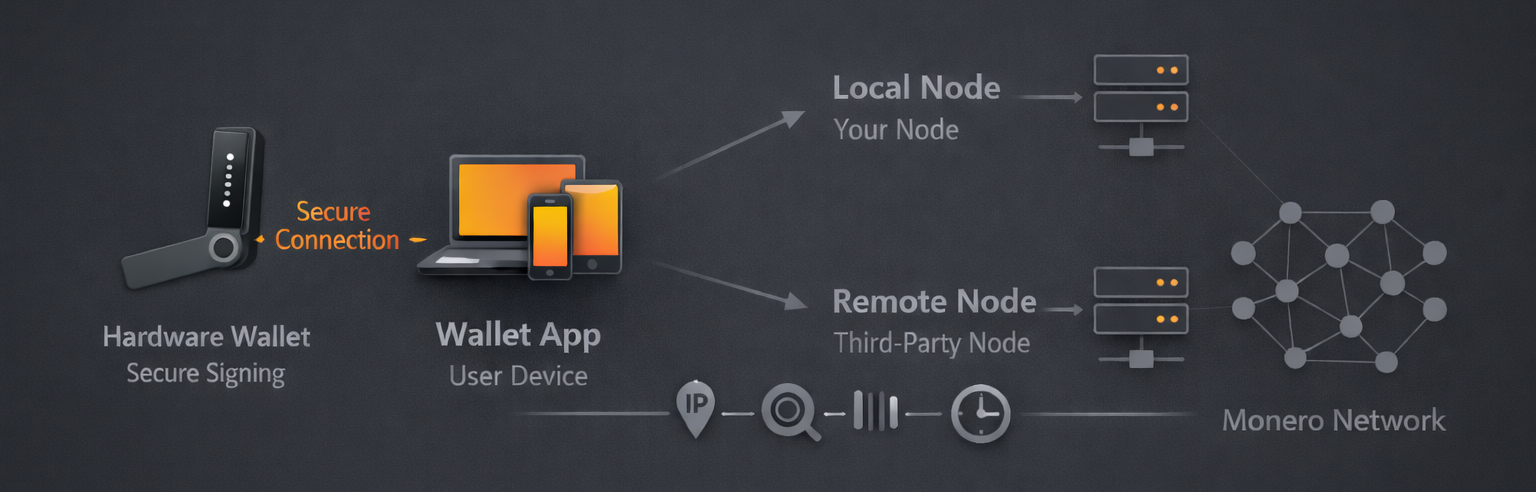
Most privacy risk in day-to-day usage comes from the node you connect to. A local node (your own daemon) minimizes what you leak to third parties. A remote node can be safe enough for some situations, but it shifts trust: the operator can observe your IP address and the timing/volume of your queries, and can attempt to mislead you about network state (even if it cannot forge valid signatures).
Official Monero documentation explains that the GUI and CLI bundles include a full node and wallet software, and it differentiates use cases for GUI vs CLI releases: Download Monero binaries (official docs).
Open-source verification and release integrity
“Open-source” is necessary but not sufficient. The practical question is: can you obtain official releases, verify what you downloaded, and see that maintenance is active? For the official desktop wallets, the Monero Project maintains code and releases publicly (for example, monero-project/monero-gui).
Operational security (realistic threat models)
Desktop and mobile have different risks. Mobile devices are more exposed to spyware, risky app ecosystems, and always-on connectivity. Desktop can be hardened more effectively, and it is the practical “home base” for running your own node and for hardware wallet integration.
Community-endorsed vs general multi-coin wallets
Monero is not “just another coin integration.” A wallet that treats Monero as a thin add-on may rely on third-party gateways, closed components, or degraded privacy defaults. As a baseline, prefer wallets that are explicitly recognized by official Monero resources such as the Monero Downloads page, and verify the project’s public code and release cadence.
Recommended wallets (2026)
The picks below are grouped by where they typically fit best. Each category lists no more than three wallets and includes a clear “why this” and “when not this.”
Quick defaults (if you want a safe starting point)
- Best default for most people on desktop: Official Monero GUI (especially if you can run a local node).
- Best for advanced control and minimal surface area: Monero CLI.
- Best “lighter” desktop wallet with modern UX: Feather Wallet.
- Best mobile picks (trade-offs apply): Cake Wallet / Monero.com, Monerujo, Stack Wallet.
Trust model comparison (what you’re really choosing)
| Option | Trust model | Payout / balance accuracy risk | Privacy considerations | Operational complexity |
|---|---|---|---|---|
| Desktop + local node | You trust your device and your own node | Lowest (you validate your own view of chain state) | Best default: node queries stay local | Highest (disk, bandwidth, time) |
| Desktop/mobile + remote node | You trust the remote node not to log/lie | Moderate (node can mislead about mempool/height; can’t forge signatures) | Remote node can observe IP + query timing/volume | Low |
| Hardware wallet + desktop app | Keys stay on device; you still trust desktop + node for context | Low–moderate (depends on host integrity and node source) | Improves key theft resistance; does not “hide” network metadata by itself | Moderate |
Desktop wallets (GUI & CLI)
1) Official Monero GUI (recommended default)
The official Monero GUI wallet is the best default for most users because it is maintained as part of the Monero Project release process and can run a local node for the strongest privacy posture. It’s also the most straightforward way to pair Monero with common hardware wallet workflows (via supported integrations).
Use it when: you want a well-supported desktop wallet with the option to run your own node and minimize reliance on third parties. Do not use it when: you cannot tolerate node sync/storage overhead or you need a minimal command-line-only environment.
Notable 2026 signal: the Monero Project continues shipping regular GUI updates (for example, Monero GUI 0.18.4.5 release notes), which is a practical indicator of maintenance and hardware compatibility fixes over time.
2) Official Monero CLI (best for maximum control)
The official Monero CLI wallet is the most direct interface to Monero’s wallet tooling. It is well-suited to advanced users, servers, and controlled environments where you prefer fewer GUI dependencies and a more auditable workflow.
Use it when: you want explicit control, scripting, or minimal surface area. Do not use it when: you are likely to make mistakes with manual workflows or you strongly prefer a graphical interface.
3) Feather Wallet (best “light” desktop option)
Feather Wallet is a respected desktop wallet that aims to be lightweight while remaining transparent and actively maintained. Its public releases and changelogs (see Feather releases) provide a straightforward way to evaluate maintenance activity and platform support.
Use it when: you want a fast desktop wallet experience without always running a full local node. Do not use it when: your priority is maximum metadata minimization—because “light” usage generally increases reliance on remote infrastructure unless you supply your own trusted node.
Desktop recommendation summary
- Default: Official GUI with a local node if feasible.
- Advanced: CLI for controlled environments and explicit workflows.
- Lightweight desktop: Feather when you accept remote-node trade-offs and want a slimmer experience.
Mobile wallets (iOS/Android)
Mobile wallets can be excellent for spending, but they are almost always a compromise compared to desktop. The main reason is not “weak cryptography.” It is the reality of mobile operating systems: background connectivity, app sandbox limitations, notification services, and higher exposure to malicious apps and device compromise.
1) Cake Wallet / Monero.com (popular, actively developed)
Cake Wallet (open-source repo) is one of the most widely used mobile wallets with strong Monero support, and the same team also maintains the Monero-focused app highlighted at Monero.com. This pairing is useful if you want a Monero-centric experience (Monero.com) or a broader but still non-custodial wallet (Cake).
Key trade-off: most mobile usage relies on remote nodes for responsiveness. That means you should treat node selection as a privacy decision, not a convenience toggle. Use it when: you need a mature, frequently updated mobile wallet. Do not use it when: your threat model includes targeted device compromise or you cannot tolerate remote-node metadata leakage.
2) Monerujo (Android; strong Monero focus)
Monerujo’s primary repository is a long-running, Monero-focused Android wallet with a clear Monero-first design philosophy. It is often chosen by users who want a more technical, transparent Monero experience on Android.
Use it when: you’re on Android and want a wallet that is deeply oriented around Monero usage patterns. Do not use it when: you need iOS support, or when your risk profile suggests mobile spending should be minimized and consolidated onto desktop.
3) Stack Wallet (open-source multi-coin with active releases)
Stack Wallet is an open-source multi-coin wallet that includes Monero support and publishes frequent release updates (see Stack Wallet releases). It can be reasonable if you deliberately want a single app for multiple assets while still being able to inspect code and releases.
Use it when: you need multi-coin convenience but still want an open-source project with visible release cadence. Do not use it when: you want the narrowest possible Monero-specific attack surface—because multi-coin complexity can increase risk and the chance of privacy-reducing defaults.
Mobile recommendation summary
- Default mobile pick: Cake Wallet / Monero.com for broad usage and ongoing maintenance.
- Android Monero-first: Monerujo.
- Open-source multi-coin compromise: Stack Wallet (only if you accept multi-asset complexity).
Hardware wallets (Ledger and Trezor)
Hardware wallets reduce the risk of key theft by keeping private keys on a dedicated device. However, they do not automatically solve privacy: you still rely on your desktop wallet software and your node source for transaction context, and a compromised host can still trick you into signing something you did not intend if you don’t verify details on-device.
Ledger (supported via Monero desktop wallets)
Ledger support for Monero is typically used through desktop wallet software such as the official GUI (Ledger provides guidance such as Monero (XMR) support instructions). The Monero Ledger app is also developed publicly (see LedgerHQ/app-monero), which helps with transparency and independent review.
Use it when: you want strong protection against private key extraction from a compromised computer. Do not use it when: you think a hardware wallet makes you anonymous—network metadata and node trust are separate problems.
Explore Ledger HW Wallets for your XMR
Trezor (supported via third-party Monero wallets)
Trezor supports Monero via third-party wallet software rather than Trezor Suite (see Monero (XMR) on Trezor). In practice, that means you use a desktop wallet (often Monero GUI/CLI) as the interface, and the Trezor device secures the key operations.
Use it when: you want hardware-isolated keys and are comfortable using third-party wallet software for the UI. Do not use it when: your plan depends on “native suite support” or you cannot operationally verify recipient/amount details on the device screen.
Explore Trezor HW Wallets for your XMR
Hardware wallet recommendation summary
- Default approach: treat hardware wallets as “key theft resistance,” not “privacy by default.”
- Best pairing: use hardware with a well-maintained desktop wallet and, ideally, your own node.
Why some popular wallets are intentionally excluded
Many mainstream multi-coin wallets market “supports Monero,” but support can mean very different things: a thin integration, reliance on third-party services, or privacy-reducing defaults. This guide intentionally prioritizes wallets that are aligned with official Monero distribution references (notably the Monero Downloads page) and that provide transparent code and releases.
Exclusion is not a moral judgment; it is an operational security stance. If a wallet is closed-source, difficult to verify, vague about node behavior, or treats Monero as a secondary add-on, it is harder to reason about what metadata it exposes and whether it will keep pace with Monero protocol and ecosystem changes.
A practical implication: if you are choosing a wallet primarily because it is “popular” or “easy,” you may unintentionally accept third-party trust that undermines Monero’s privacy goals. Prefer a wallet with clear Monero-first design, transparent releases, and a node strategy you understand.
Decision guidance: choose a wallet that fits your risk profile
Profile A: “I want the safest default without being an expert”
- Recommendation: Official Monero GUI with a local node if feasible.
- Why: reduces third-party node trust and aligns with official distribution.
- Trade-off: storage, bandwidth, and sync time.
Profile B: “I want maximum control and minimal surface area”
- Recommendation: Monero CLI (often paired with your own node).
- Why: explicit workflows and fewer GUI dependencies.
- Trade-off: steeper learning curve and higher chance of user error.
Profile C: “I need mobile spending, but I care about privacy”
- Recommendation: Cake Wallet / Monero.com or Monerujo (Android), with deliberate node choices.
- Why: mature mobile support while remaining non-custodial.
- Trade-off: remote node metadata risk and higher mobile compromise risk.
Profile D: “I want stronger protection against key theft”
- Recommendation: Hardware wallet (Ledger or Trezor) paired with a desktop wallet.
- Why: keys stay on the device; signing is isolated.
- Trade-off: still must trust your host and node for context; UX overhead.
Two high-impact checks before you commit
- Check 1: Where does your wallet get chain data? If it uses a remote node by default, decide whether you accept that trust and metadata exposure.
- Check 2: Can you independently verify your funds and history? Understanding view-only verification improves safety when you need to share limited information. See: How to verify your funds with a private view key.
FAQs
Is a “light wallet” unsafe for Monero?
A light wallet is not automatically unsafe, but it shifts what you trust and what you may leak. The main reason is that light wallets typically rely on remote nodes, and remote nodes can observe your IP address and the timing/volume of your requests even if they cannot spend your funds. Practically, this means you should treat “node selection” as part of your privacy setup, not a background detail, and prefer your own node when feasible. Common misunderstanding: “Light wallet” does not mean “weaker cryptography”; it usually means “more reliance on someone else’s infrastructure.”
Do hardware wallets make Monero transactions private by default?
Hardware wallets mainly protect keys from extraction and reduce the chance that malware steals your spend key. They do not, by themselves, hide network-level metadata or prevent a remote node from learning about your connection patterns. The practical implication is that you should pair hardware wallets with a trustworthy desktop wallet and, ideally, your own node—privacy and key security are separate layers. Common misunderstanding: many people assume “hardware wallet = anonymous,” but hardware wallets primarily address key theft, not node trust or IP metadata.
Why are some popular multi-coin wallets excluded even if they claim Monero support?
Monero support varies widely: some wallets treat Monero as a thin add-on or rely on third-party services that you cannot easily audit or verify. The reason this matters is that wallet design choices can expose metadata (node usage, address book patterns, timing) even without “stealing” funds, undermining what most users want from Monero. Practically, you should prefer wallets aligned with official Monero resources like the Monero Downloads page and with transparent code and releases you can inspect. Common misunderstanding: “supports Monero” does not necessarily mean “supports Monero safely with privacy-preserving defaults.”
Is the official Monero GUI always better than Feather?
The official GUI is the best default if you can run a local node and want the most direct alignment with Monero Project releases, but “better” depends on constraints. Feather is often chosen for a lighter desktop experience and can be a reasonable option when you accept remote-node trade-offs and want a fast UI, backed by visible releases such as Feather’s release history. Practically, if your priority is minimizing third-party trust, the official GUI + local node is the stronger privacy posture; if your priority is lighter resource use, Feather may fit better. Common misunderstanding: choosing a lighter wallet does not “break Monero privacy,” but it can increase metadata exposure depending on node usage.
What is the single most important habit for safer wallet use?
Treat your seed phrase as the wallet, and protect it accordingly: if someone gets the seed, they effectively get your funds. The reason is simple: Monero keys are bearer instruments—there is no help desk and no account recovery if the seed is exposed. Practically, you should keep seeds offline, avoid storing them in cloud notes/email, and consider view-only approaches when you must share limited proof of funds (see view key verification guidance). Common misunderstanding: people often focus on “which app is best” and neglect seed handling, which is usually the real failure point.
 monero.how